
Room Color Combinations: How to Match Walls and Floors (and Let AI Pair Them for You)
By Curtis (RoomDreaming Editor)
The easiest way to get a room color combination right: make one accent wall the star, then let the other walls and the floor step back and echo it. If you still can't decide, use AI style pairing — pick a style you like, and it applies a complete set of a brand's real products to a photo of your room.
Open almost any brand's room visualizer and you'll see a row of tiles and a row of paints. Then comes the obvious question: "Okay… which ones?"
Every product looks good on its own. Nobody tells you which wall goes with which floor. You can try them one by one, but after a dozen tries most people still aren't sure which set is right.
How do you match wall and floor colors?
Three rules cover most rooms:
- One star, not five: Pick the most visible wall — usually the TV wall or the wall behind the sofa — as the accent wall, and give it the material with the most color or texture. Keep the other walls quiet.
- Separate light and dark: Walls and floor should differ in depth. A light wood floor with a deeper accent wall, or a dark floor with light walls, both read better than everything at the same depth.
- Same color family, different texture: If you're worried about clashing, stay in one color family and vary the texture — warm grey walls, a warm wood floor, and a metallic or textured paint on the accent wall.
For choosing the floor itself, see how to choose a wood floor color.
If the rules are simple, why is it still hard?
Because the rules are abstract and the products are specific. "Warm grey with light oak" sounds clear, but a brand's catalog may have dozens of warm greys and a dozen light oak floors. Turning the rule into one actual set still means trying them one at a time.
Samples don't help much either. A paint chip or a single tile in your hand tells you very little about a whole wall next to a whole floor.
So people who can't decide usually don't pick the wrong thing — they don't pick at all. "Let me think about it" quietly becomes no decision.
How does AI style pairing work?
It hands the "pick one set" step to AI. It only takes a few taps:
- Add a room photo: Take a photo of your own living room, or choose a sample room.
- Choose AI style pairing: The app asks how you'd like to match. Choose AI style pairing — or "pick my own" if you'd rather browse products yourself.
- Pick a style you like: For example "gilded glamour", "calm and understated" or "natural texture", or a material feel such as metallic sheen or travertine.
- See the whole set in your room: The app picks the combination that best fits that style — the accent wall, the other walls, and in some sets the floor or ceiling — and applies it to your photo in one go.
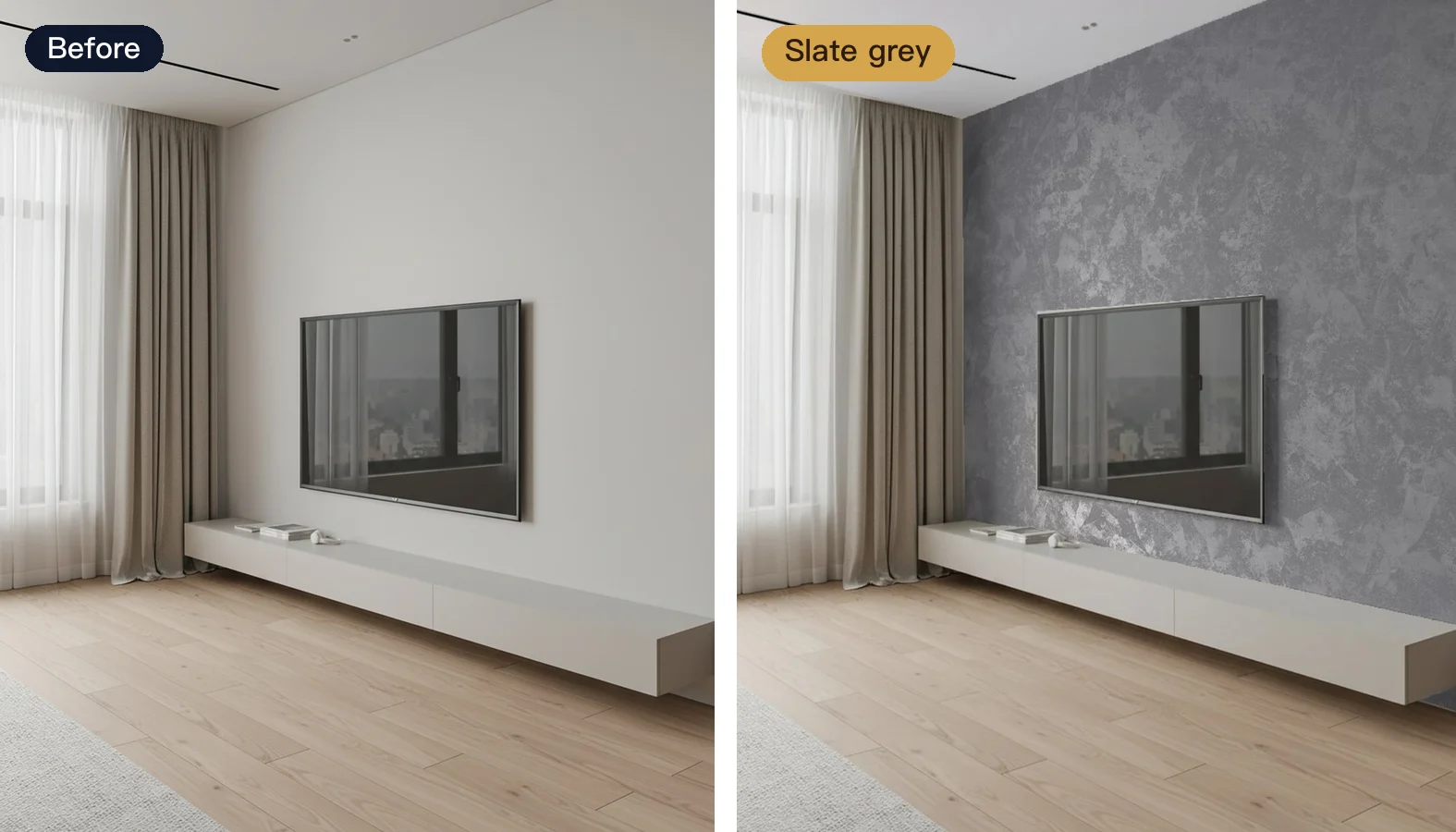
This living room started with a plain white wall. With a slate-grey combination applied, the TV wall becomes a pearlescent grey art paint that sits deeper than the light wood floor — and the room suddenly has layers.
These combinations aren't random. For each brand, every set is first proposed by AI from the brand's own products and color rules, then checked by a person in a real room scene before it goes live.
Can I try several combinations on the same room?
Yes — and you should. Once a set is applied, other combinations are listed right beside it; one tap switches. You can filter by style or material, and every set shows a preview and the products it uses.
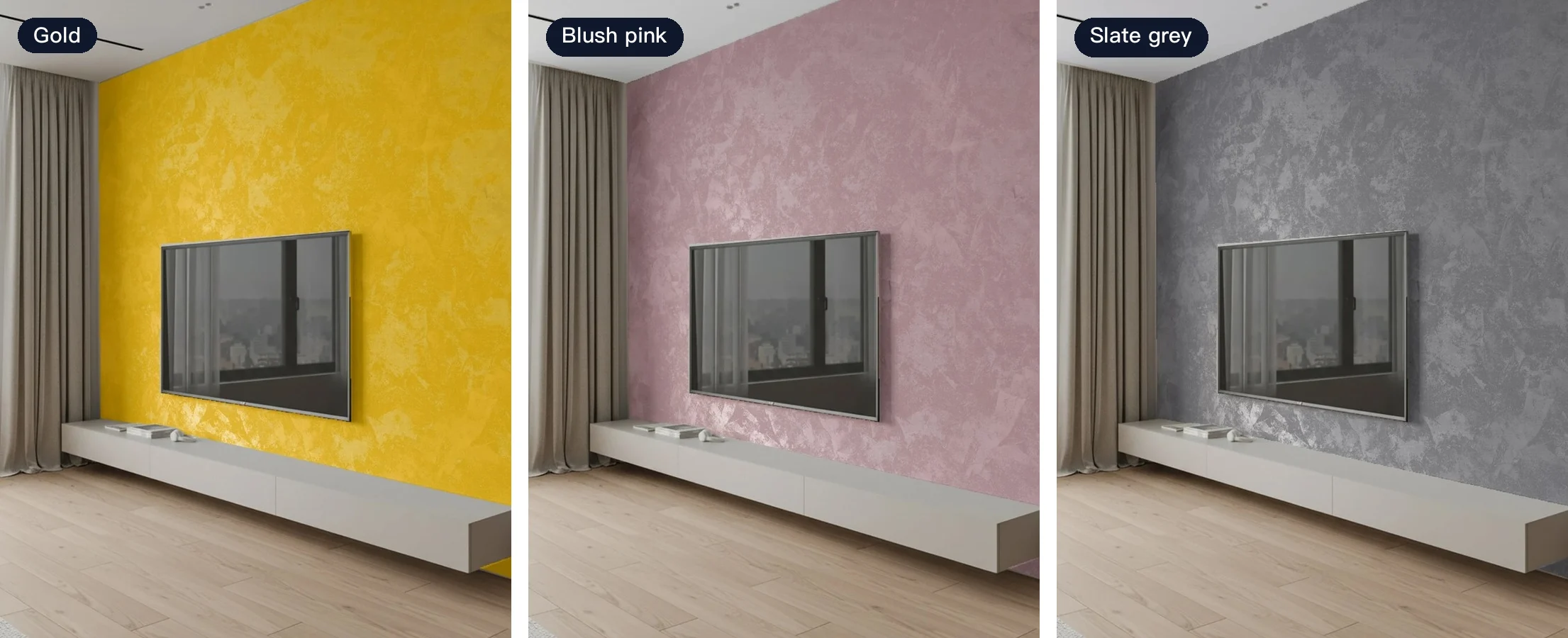
Same room, same wood floor — gold, blush pink and slate grey on the accent wall give three completely different moods. All three use products from San Marco, a Taiwanese art paint brand.
Once you have a direction you like, switch to "pick my own" to fine-tune: keep the feel of the set and swap just one surface. Starting from a blank page is hard; editing a finished combination is easy.
How does this help building material brands?
A customer who can't decide tends to stall at "let me think about it". AI style pairing gets them past the first step: it matches their room with combinations built only from your products.
- Every product is yours: No other brand's materials show up, and each surface is labeled with the exact product.
- Customers stay longer: Flipping through one finished set after another is far easier than staring at a full catalog.
- Sales reps get a better conversation: The customer comes back with a set they already like, so the talk is about specific products and colors.
To see how paint sheen and texture show up in a photo, read art paint samples vs AI visualization.
FAQ
Does AI style pairing work on a photo of my own room?
Yes. Upload a photo of your room, or pick a sample room, and the whole combination is applied to the walls and floor in that photo — what you see is your own space.
Are the paired products real products I can buy?
Yes. Every combination is built from real products in that brand's catalog, and once applied it shows which product is on each surface, so you can take it straight to the brand or a sales rep.
What if I don't like the combination the AI picked?
Pick another style, choose a different combination from the list, or switch to "pick my own" and swap out a single surface while keeping the rest of the set.
Help customers who can't decide find a set they love
To let your customers see complete combinations of your products in a photo of their own room, take a look at the RoomDreaming room visualizer.
Try it on a photo of your own room
Upload a photo and swap in real products to see them in your space. No download, no sign-up.