
What Is a Tile Visualizer? How AI Tile Visualization Gets Size, Pattern, Grout and Layout Right
By Curtis (RoomDreaming Editor)
A tile visualizer puts a real tile into a photo of the customer's own room, so they can see it installed before they buy. A good one doesn't just paste a pattern on the wall. It gets four things right: the tile's real size, its face variations, the grout color, and the layout pattern.
In Taiwan the tile trade calls this "tao-tu" (literally "fitting the image"). Customers search for a tile visualizer or tile design app. It's all the same idea: upload a photo, swap the tile, see the result.
Not long ago, seeing a tile in place meant asking a designer to retouch a photo or build a 3D model, and waiting again for every change. Now a customer snaps a photo on their phone, opens a link from the brand, and compares tiles on the spot.
But not every tile visualizer is equally good. These four things are where tile previews most often go wrong.
Why does tile size have to be exact?
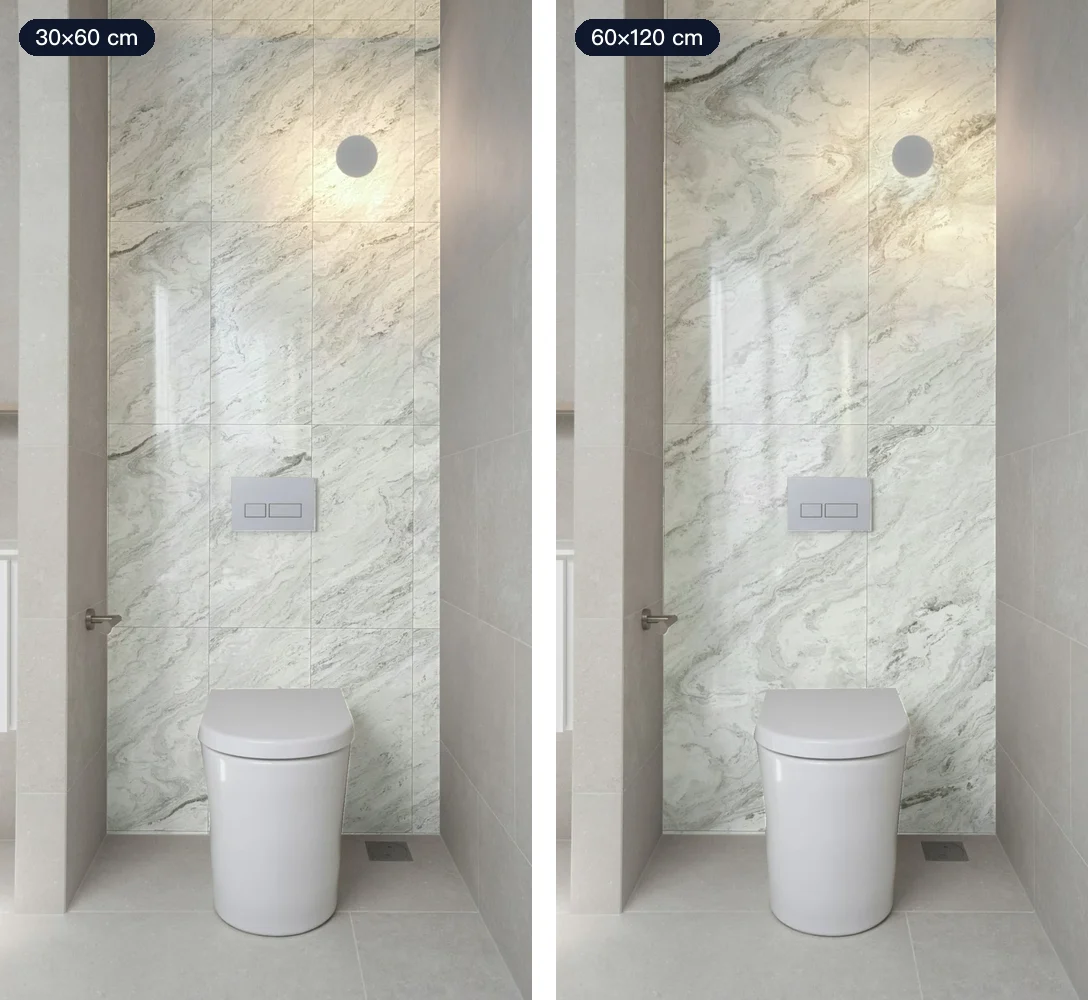
The same design in 30×60 cm and 60×120 cm looks completely different on the same wall. Smaller tiles mean more grout lines and a busier look; larger tiles mean fewer joints and a calmer, more expansive wall.
If a visualizer just scales a pattern image up or down, the tile the customer sees may not be the size they'll actually buy. RoomDreaming first estimates the real dimensions of the wall or floor in the photo, then lays the tile piece by piece at the product's actual size.
What's the difference between random shipping and vein matching?
Many people don't realize that a stone-look tile isn't the same on every piece. Factories produce several different faces (often called face or print variation). There are two ways those faces go on the wall:
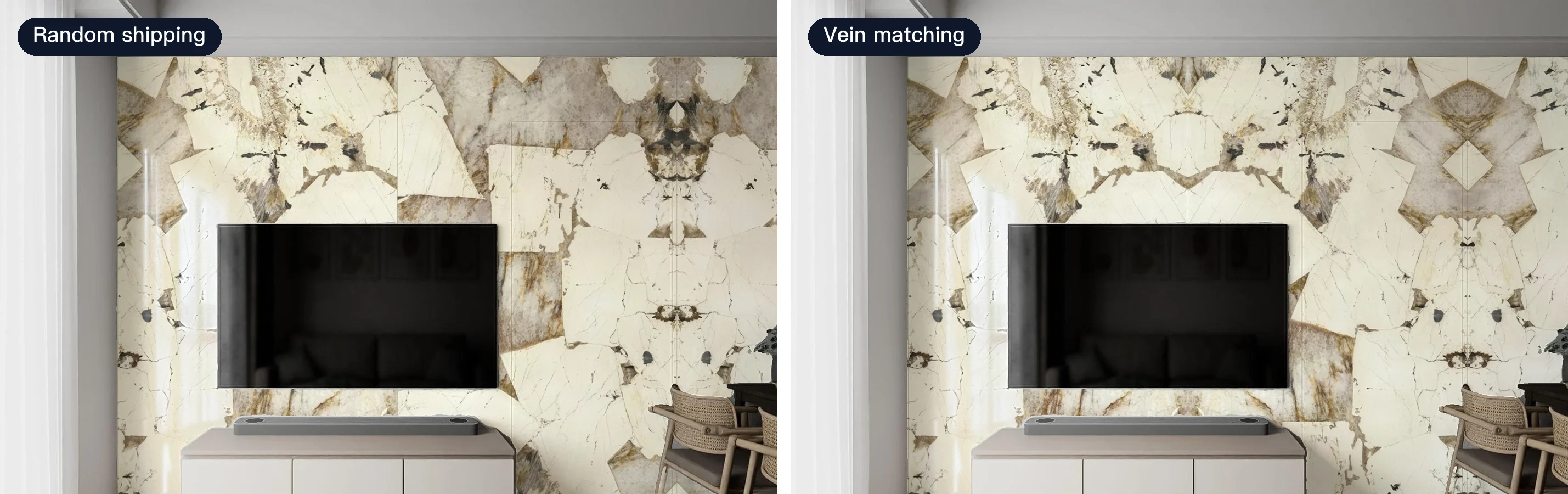
- Random shipping (mixed faces): faces are mixed at random, so the wall looks natural without obvious repeats.
- Vein matching (sequential layout): tiles are laid in numbered order so the veining flows from one piece to the next, like a single slab of stone.
Here is the same TV wall with the same large format slab, changing only the layout. On the left each slab sits in its own direction; on the right the veining connects into a symmetrical pattern.
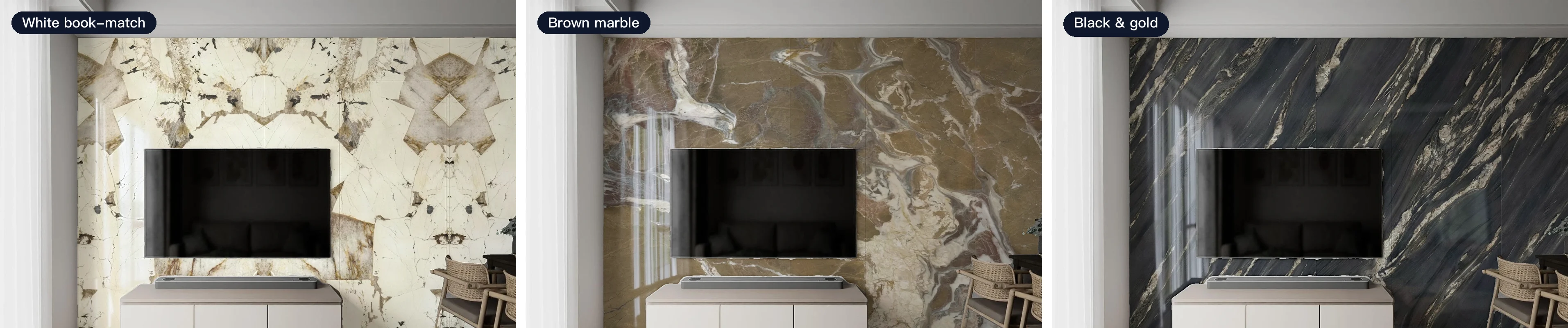
Large format TV walls are where vein matching is used most. And even with the same layout, the color changes the wall's personality entirely:
Repeating a single product photo across the whole wall creates the "wallpaper" effect: the same patch of veining lined up in rows. Customers spot it instantly. RoomDreaming loads every face of each tile and arranges them the way the brand actually ships them; if a product comes both ways, customers can switch between them on the same photo. For more on slab walls, see vein-matched large format tile.
How much does grout color change the look?
Grout is the most visible line on a tiled wall. Take one white wall tile and change only the grout:
- White grout: the lines almost disappear and the wall reads as one clean surface.
- Gray grout: the grid shows, but quietly, and it hides dirt better.
- Black grout: every tile is outlined, for the boldest, most graphic look.
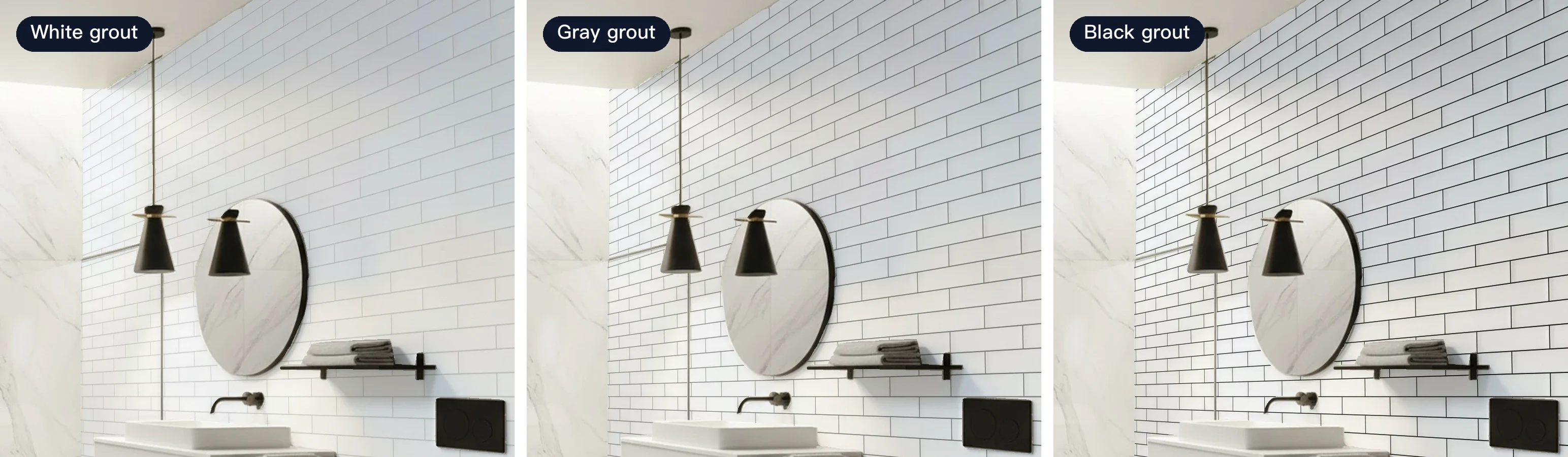
White or gray is a question people agonize over. In RoomDreaming, brands can set a recommended joint width and grout color for each tile, and customers can switch colors on the same photo to settle it in seconds. Our grout color guide goes deeper.
Straight lay or offset?
The layout pattern sets the rhythm between tiles. The most common options:
- Straight lay (stack bond): edges line up into a grid. Clean and modern.
- Offset (running bond): each row shifts by half (1/2) or a third (1/3) of a tile. Livelier and more classic.
- Herringbone and hexagon: more design-led, good for a feature wall or floor.
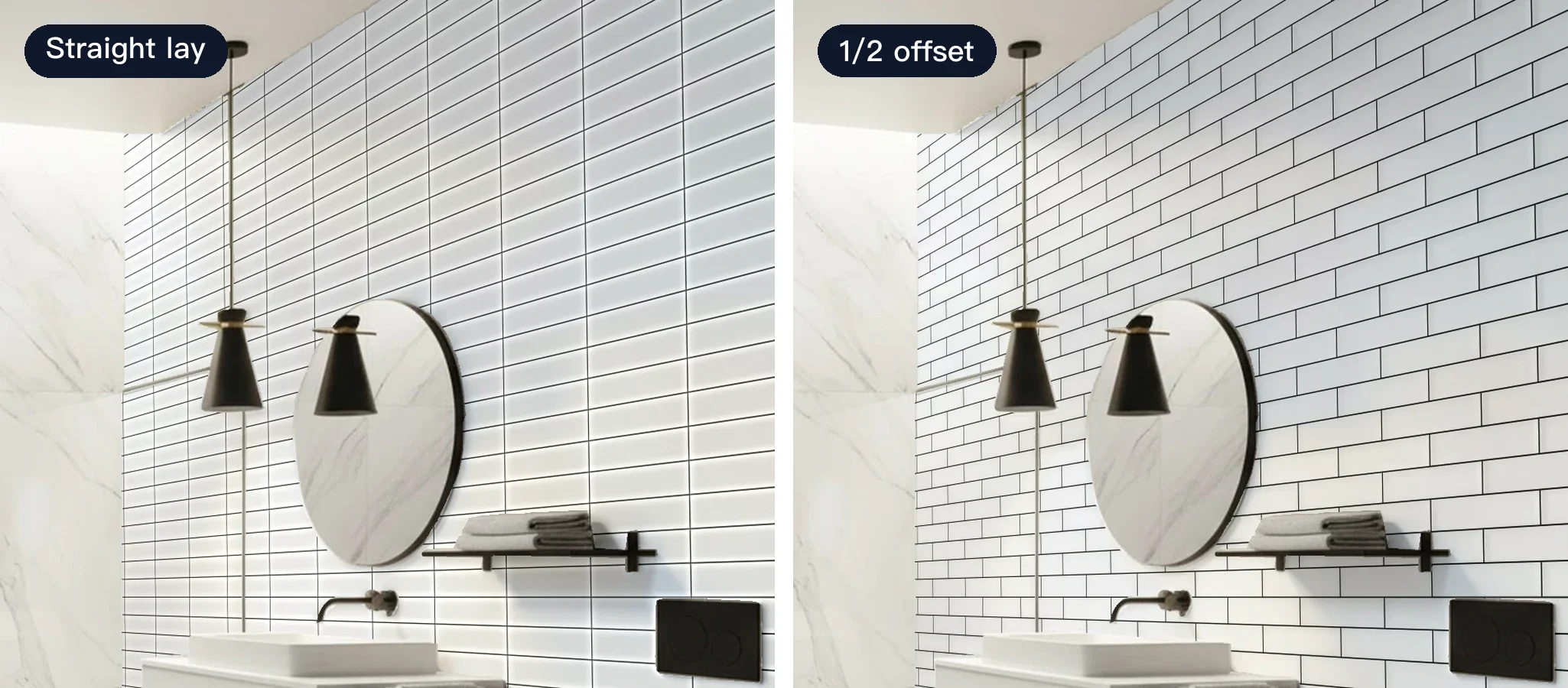
Long rectangular tiles are often slightly higher in the middle than at the ends after firing. A 1/2 offset puts the high point of one tile next to the low point of the next, which makes the difference most visible, so long tiles are usually laid at a 1/3 offset instead. The manufacturer's guidance and the installer's judgment come first.
How do tile brands use a tile visualizer?
The same tool works in three places:
- Your website: customers who find you through search try your tiles right there.
- A personal link for each sales rep: reps send it to designers and homeowners over messaging apps (in Taiwan, that's LINE), who compare at home on their own photos.
- A showroom QR code: placed next to the sample wall, so visitors keep comparing after they leave.
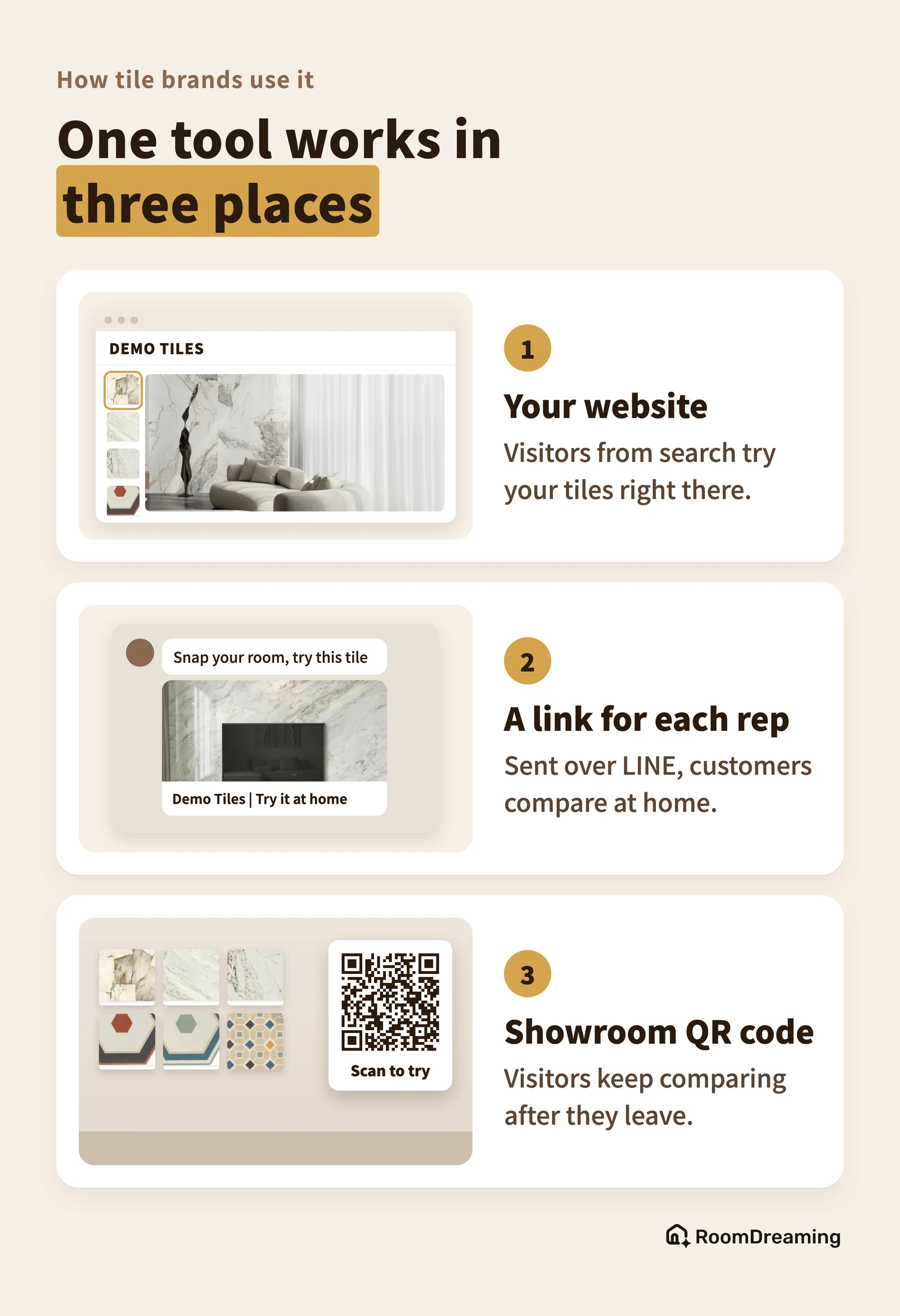
Only your products appear, never a competitor's. RoomDreaming already carries 8,000+ building materials across art paint, wood flooring, tile and more. A brand just needs each tile's size, face images, layout and recommended pattern to go live.
One tile rep told us customers used to show him saved photos from the internet and ask, "Will this one look like that?" All he could do was answer from experience. Once he started asking customers to take a photo of their own room and put that tile on it, the conversation changed from "does it look like that?" to "this one or that one?"
FAQ
What does a tile visualizer do?
It places a real tile product into a photo of your own room, so you can see how the wall or floor will look once it's installed, before you buy or order samples.
What's the difference between random shipping and vein matching?
Most stone-look tiles come in several different faces. Random shipping mixes them so the surface looks natural; vein matching lays them in numbered order so the veining flows from one tile into the next, like one piece of stone.
How accurate is an AI tile visualizer?
It depends on whether it uses real product data: size, faces, layout, grout and pattern. It's ideal for narrowing down options and talking with family or a designer; for final color and texture, still check a physical sample.
Let customers choose tile on a photo of their own home
To see your tiles laid into a customer's photo at real size, with real faces and grout, take a look at the RoomDreaming tile visualizer or book a demo.
Try it on a photo of your own room
Upload a photo and swap in real products to see them in your space. No download, no sign-up.